Stripe Webhook Best Practices: Reliability, Security, and Error Handling
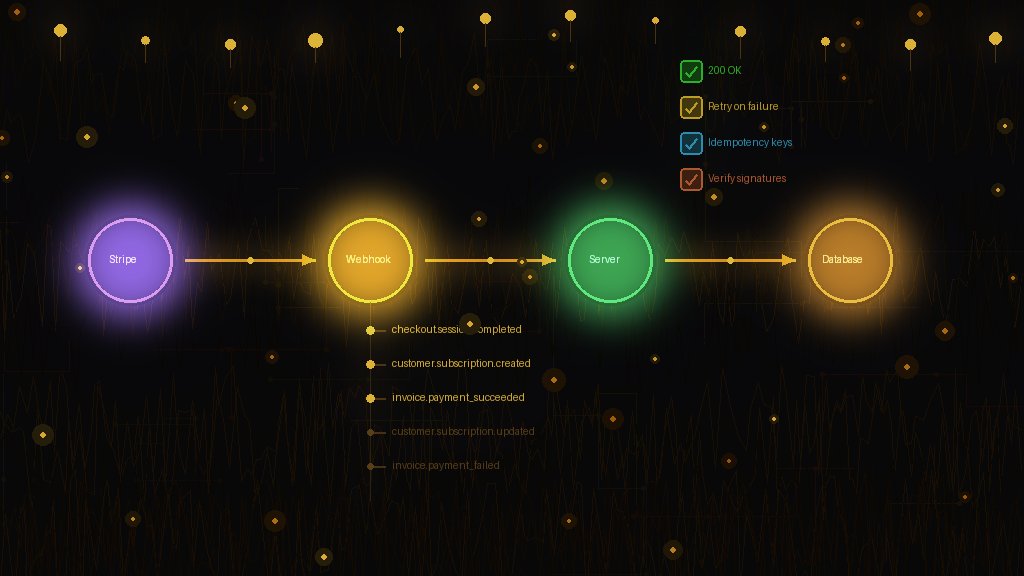
Webhooks Are Where Stripe Integration Gets Real
Integrating Stripe Checkout takes an afternoon. Handling webhooks correctly takes weeks of iteration—unless you know the patterns upfront.
Webhooks are how Stripe tells you what happened: successful payments, failed charges, subscription changes, disputes. Get them wrong, and you'll have:
This guide covers everything you need to handle Stripe webhooks reliably.
The Essential Events to Handle
You don't need to handle every Stripe event. Focus on these:
For subscriptions:
For one-time payments:
Start with these. Add more events only when you have a specific need.
Rule 1: Always Verify Webhook Signatures
Every webhook request from Stripe includes a signature in the `Stripe-Signature` header. Always verify it.
const stripe = require('stripe')(process.env.STRIPE_SECRET_KEY);
app.post('/webhooks/stripe', express.raw({type: 'application/json'}), (req, res) => {
const sig = req.headers['stripe-signature'];
let event;
try {
event = stripe.webhooks.constructEvent(
req.body,
sig,
process.env.STRIPE_WEBHOOK_SECRET
);
} catch (err) {
console.error('Webhook signature verification failed:', err.message);
return res.status(400).send('Webhook Error');
}
// Process the verified event
handleEvent(event);
res.status(200).json({ received: true });
});
Critical: Use `express.raw()` or equivalent to get the raw body. If you parse JSON first, signature verification will fail.
Without signature verification, attackers can send fake webhook events to your endpoint and grant themselves free subscriptions.
Rule 2: Make Handlers Idempotent
Stripe may deliver the same webhook multiple times. Your code must handle duplicates gracefully.
Bad approach:
// This creates duplicates
async function handleSubscriptionCreated(event) {
await db.subscriptions.create({
stripeId: event.data.object.id,
status: 'active'
});
}
Good approach:
// This is idempotent
async function handleSubscriptionCreated(event) {
const subscription = event.data.object;
await db.subscriptions.upsert({
where: { stripeSubscriptionId: subscription.id },
create: {
stripeSubscriptionId: subscription.id,
status: subscription.status,
customerId: subscription.customer
},
update: {
status: subscription.status
}
});
}
Use `upsert` operations or check for existing records before inserting. The same webhook processed twice should produce the same result.
Rule 3: Respond Quickly, Process Later
Stripe expects a 2xx response within 20 seconds. If your handler takes longer, Stripe will retry—and you'll get duplicate deliveries.
Pattern: Acknowledge immediately, process asynchronously
app.post('/webhooks/stripe', async (req, res) => {
const event = verifyAndParseEvent(req);
// Queue for background processing
await eventQueue.add('stripe-webhook', {
eventId: event.id,
type: event.type,
data: event.data
});
// Respond immediately
res.status(200).json({ received: true });
});
This pattern prevents timeouts and ensures you can process events at your own pace.
Rule 4: Handle Out-of-Order Delivery
Webhooks don't arrive in order. You might receive `subscription.updated` before `subscription.created`. Your code must handle this.
Strategies:
1. Check timestamps: Compare `event.created` with your last processed event for that resource. Ignore older events.
2. Fetch current state: Instead of trusting the webhook payload, fetch the current resource from Stripe's API.
async function handleSubscriptionUpdated(event) {
const webhookSubscription = event.data.object;
// Fetch current state from Stripe
const currentSubscription = await stripe.subscriptions.retrieve(
webhookSubscription.id
);
// Use the authoritative current state
await updateLocalSubscription(currentSubscription);
}
This approach ensures you always have the latest state, regardless of webhook ordering.
Rule 5: Log Everything
When something goes wrong with billing, you need to debug it. Log webhook events comprehensively:
async function handleEvent(event) {
console.log({
message: 'Processing webhook',
eventId: event.id,
eventType: event.type,
resourceId: event.data.object.id,
timestamp: new Date().toISOString()
});
try {
await processEvent(event);
console.log({ message: 'Webhook processed', eventId: event.id });
} catch (error) {
console.error({
message: 'Webhook processing failed',
eventId: event.id,
error: error.message,
stack: error.stack
});
throw error; // Stripe will retry
}
}
Store events in your database too. You'll thank yourself when debugging "why didn't their subscription activate?"
Rule 6: Implement Proper Error Handling
Return the right status codes:
On 5xx errors, Stripe will retry with exponential backoff over 72 hours. On 4xx errors, Stripe won't retry.
app.post('/webhooks/stripe', async (req, res) => {
try {
const event = verifyEvent(req);
await processEvent(event);
res.status(200).json({ received: true });
} catch (error) {
if (error instanceof SignatureVerificationError) {
return res.status(400).json({ error: 'Invalid signature' });
}
if (error instanceof TemporaryError) {
// Return 500 so Stripe retries
return res.status(500).json({ error: 'Temporary failure' });
}
// Unknown error - log and return 500
console.error('Webhook error:', error);
res.status(500).json({ error: 'Internal error' });
}
});
Rule 7: Use a Webhook Management Platform
Handling webhooks correctly requires:
That's a lot of infrastructure for something that isn't your core product.
At StackBE, webhook handling is built-in. We receive webhooks from Stripe, process them reliably, and update subscription states in real-time. You query our API for the current state—no webhook handling needed.
This approach aligns with keeping billing logic outside your core app. You focus on your product; we handle the plumbing.
Testing Your Webhook Implementation
Use the Stripe CLI for local testing:
stripe listen --forward-to localhost:3000/webhooks/stripe
stripe trigger checkout.session.completed
Test edge cases:
Monitor in production:
Common Pitfalls to Avoid
1. Not using the raw body for signature verification
Parsed JSON won't match the signature. Use raw bytes.
2. Hardcoding webhook secrets
Use environment variables. Rotate secrets periodically.
3. Trusting webhook data blindly
Verify signatures. Fetch current state for critical operations.
4. No idempotency
Process the same event twice, get the same result.
5. Blocking the response
Respond quickly, process in background.
6. Ignoring failed webhooks
Monitor the Stripe dashboard for failed deliveries.
Summary
Stripe webhooks are powerful but require careful implementation. Follow these rules:
1. Always verify signatures
2. Make handlers idempotent
3. Respond quickly, process later
4. Handle out-of-order delivery
5. Log everything
6. Return appropriate status codes
7. Consider using a managed platform
Get these right, and your billing integration will be rock-solid. As we covered in the subscription lifecycle guide, webhooks are where most billing implementations break down. Don't let that be you.