SaaS Subscription States: A Complete Guide to Trialing, Active, Past Due, and Canceled
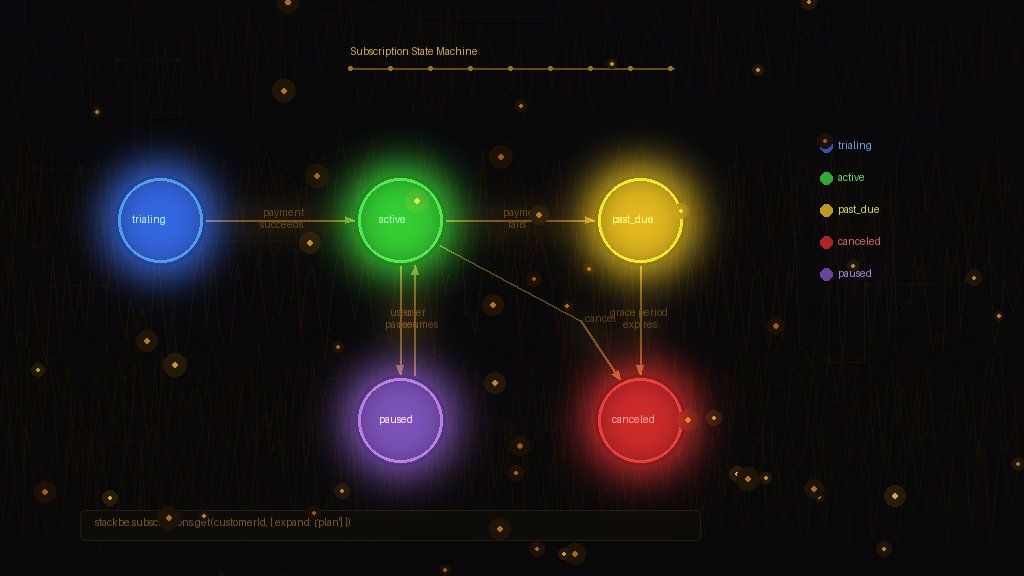
Subscription State Is More Complex Than You Think
"The subscription is either active or canceled, right?"
If only it were that simple.
Real subscription systems have multiple states, each with different implications for access, billing, and user experience. Get this wrong, and you'll either give away free access or wrongly lock out paying customers.
This guide covers every subscription state, when transitions happen, and how to handle each one correctly.
The Core Subscription States
Most billing systems recognize these fundamental states:
Trialing — Customer is in a free trial period. No payment collected yet. Trial may require a payment method upfront or not.
Active — Customer has an active, paid subscription. Payments are current. Full access granted.
Past Due — Payment failed on the most recent invoice. Subscription is technically still active, but there's an outstanding balance.
Canceled — Subscription has ended. Could be voluntary cancellation or involuntary (payment failures exhausted).
Paused — Subscription is temporarily suspended. Customer retains their plan but isn't being charged. (Not all systems support this.)
Unpaid — Multiple payment attempts failed. Subscription is suspended but not yet canceled. (Stripe-specific state.)
State Transition Diagram
┌─────────────┐
│ START │
└──────┬──────┘
│
┌──────▼──────┐
┌────────┤ Trialing │
│ └──────┬──────┘
│ │ Trial ends
│ ┌──────▼──────┐
│ │ Active │◄────────────┐
│ └──────┬──────┘ │
│ │ Payment fails │ Payment succeeds
│ ┌──────▼──────┐ │
│ │ Past Due ├─────────────┘
│ └──────┬──────┘
│ │ Retry limit reached
│ ┌──────▼──────┐
└───────►│ Canceled │
└─────────────┘
Trialing: The First Impression
What it means: Customer is evaluating your product. They may or may not have entered payment details.
Access level: Full access to trial features. May be the full product or a limited trial tier.
Transitions:
Implementation tips:
if (subscription.status === 'trialing') {
const daysLeft = differenceInDays(
new Date(subscription.trialEnd),
new Date()
);
if (daysLeft <= 3) {
showTrialEndingWarning(daysLeft);
}
grantAccess(); // Full access during trial
}
Trial end handling: Send reminder emails at 3 days, 1 day, and on the final day. Make it easy to add a payment method or upgrade.
Active: The Happy Path
What it means: Customer is paying, payments are current, everyone is happy.
Access level: Full access to their plan's features.
Transitions:
Implementation tips:
if (subscription.status === 'active') {
const entitlements = await getEntitlements(subscription.planId);
grantAccess(entitlements);
// Optional: show upgrade prompts based on usage
if (isApproachingLimit(customer, 'api_calls')) {
showUpgradePrompt();
}
}
Common mistake: Assuming "active" means "will renew." Check `cancelAtPeriodEnd` — the customer may have scheduled a cancellation.
Past Due: The Danger Zone
What it means: The last payment attempt failed. Stripe is retrying automatically (default: up to 4 attempts over ~3 weeks).
Access level: This is where it gets philosophical. Options:
1. Full access: Don't punish customers for card issues. They'll fix it.
2. Degraded access: Allow read-only or limited features.
3. No access: Hard cutoff. Risk losing the customer entirely.
We recommend full access with prominent warnings. Most payment failures are resolved within a few days.
Transitions:
Implementation tips:
if (subscription.status === 'past_due') {
const daysPastDue = differenceInDays(
new Date(),
new Date(subscription.currentPeriodEnd)
);
// Grace period: full access for 7 days
if (daysPastDue <= 7) {
grantAccess();
showPaymentWarning('Your payment failed. Please update your card.');
} else {
// After grace period: limited access
grantLimitedAccess();
showPaymentCritical('Update payment to restore full access.');
}
}
Learn more about handling failed payments in our guide on subscription lifecycle management.
Canceled: The End (Maybe)
What it means: Subscription has terminated. No more billing. But the story isn't necessarily over.
Access level: Depends on your business model:
Two types of cancellation:
1. Immediate: Subscription ends now. `status: canceled`, `currentPeriodEnd: now`
2. At period end: Customer canceled but prepaid time remains. `status: active`, `cancelAtPeriodEnd: true` until the period ends
Implementation tips:
if (subscription.status === 'canceled') {
// Check if they're in the post-cancellation grace period
const daysSinceCanceled = differenceInDays(
new Date(),
new Date(subscription.canceledAt)
);
if (daysSinceCanceled <= 30) {
// Easy re-activation window
showReactivatePrompt();
grantLimitedAccess(); // Let them see their data
} else {
denyAccess();
showSubscribePrompt();
}
}
Handling "Cancel at Period End"
This is a critical nuance. When a customer cancels but has prepaid time:
// subscription.status is still 'active'
// but subscription.cancelAtPeriodEnd is true
if (subscription.status === 'active' && subscription.cancelAtPeriodEnd) {
// Grant access until period ends
grantAccess();
// Show "You've canceled" messaging
showCancellationNotice(subscription.currentPeriodEnd);
// Offer to undo cancellation
showUndoCancellationOption();
}
Don't cut off access early. They paid for that time.
Implementing a hasAccess() Function
Here's a production-ready access check that handles all states:
function hasAccess(subscription, options = {}) {
const { gracePeriodDays = 7 } = options;
// No subscription = no access (unless you have a free tier)
if (!subscription) return false;
// Active or trialing = access
if (['active', 'trialing'].includes(subscription.status)) {
return true;
}
// Past due with grace period
if (subscription.status === 'past_due') {
const daysPastDue = differenceInDays(
new Date(),
new Date(subscription.currentPeriodEnd)
);
return daysPastDue <= gracePeriodDays;
}
// Canceled but within prepaid period
if (subscription.status === 'canceled') {
return new Date() < new Date(subscription.currentPeriodEnd);
}
return false;
}
State Management Best Practices
1. Don't rely on webhooks alone
Webhooks can be delayed or missed. Periodically sync subscription state from your payment provider.
2. Store the full subscription object
Don't just store `status`. Store `currentPeriodEnd`, `cancelAtPeriodEnd`, `trialEnd`, and other relevant fields.
3. Centralize access logic
Have one `hasAccess()` function that all your code uses. Don't scatter subscription checks throughout your codebase.
4. Log state transitions
When a subscription changes state, log it. You'll need this for debugging and customer support.
5. Handle edge cases explicitly
What if the subscription is `past_due` AND `cancelAtPeriodEnd` is true? Define your behavior for every combination.
Using StackBE for State Management
StackBE handles subscription state complexity for you:
As we've explained in our guide to entitlements vs feature flags, tying access to subscription state—not manual flags—simplifies your entire codebase.
Summary
Subscription states are more nuanced than "active or not." Understanding each state and its implications helps you:
Get state management right, and the rest of your billing implementation becomes much simpler.